Create/Save Electronic Records |
  
|
Create/Save Electronic Records |
|
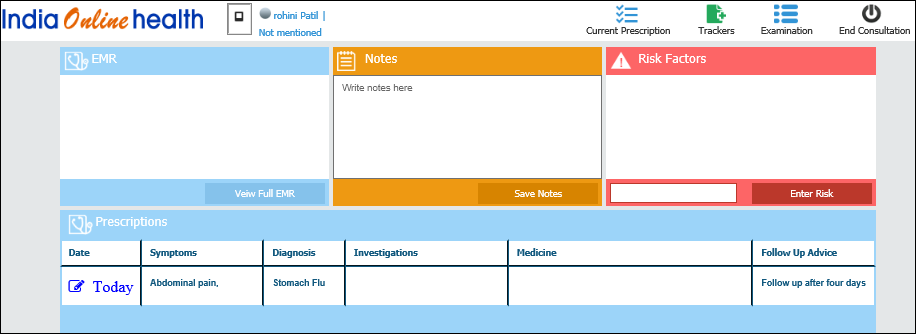
The Dashboard Consultation allows you to create and save complete electronic records for your patient.
| · | The following notes are displayed for creating electronic records: |
| § | EMR - Allows you to create notes and view EMR (Electronic Medical Record) of patient. |
| § | Notes - Allows you to type and save notes. |
| § | Risk Factors - Allows you to type the risk factors of patient and save the same. |
| § | Prescriptions - Allows you to type, save, and recall a prescription. |
| · | The following buttons are displayed for opening and creating other essential electronic records: |
| § | Current Prescription - Opens the electronic prescription form. |
| § | Trackers - Opens notes for creating and saving trackers. |
| § | Examination - Displays forms for creating detailed medical records of complete medical examination of patient. |
| · | End Consultation - Allows you to end the consultation. |
Dashboard Upcoming Appointments