View Patient Details |
  
|
View Patient Details |
|
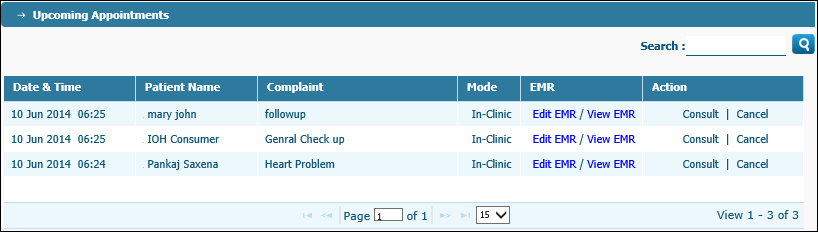
When you access Upcoming Appointments, the Upcoming Appointments page displays:
View Patient Details
| · | Search - Type the patient name and click the Search button to search for a patient by name. |
| · | View |
| § | Date & Time of appointment - The first column displays the date and time of upcoming appointment for patient. |
| § | Name of Patient - the Patient Name column displays name of patient. |
| § | Complaint - the Complaint column displays nature of complaint. |
| § | Mode (In-clinic/Online) - The Mode column displays the place of appointment - In-clinic (name of clinic) or Online etc. |
| § | View / Edit EMR - The EMR column displays the following links: |
| · | Edit EMR - Click the link to edit the Electronic Medical Record of the patient. |
| · | View EMR - Click the link to view the Electronic Medical Record of the patient. |
| · | Start or cancel a consultation online: The Action column displays the following links: |
| · | Consult: Click the Consult link to start writing an electronic Visit Summary and saving/storing the same. |
| · | Cancel: Click the Cancel link to cancel the consultation records. |